
Pricing and Pro subscription
How Free differs from Pro, how billing works, and what to know before you subscribe.
What this page does
There's no separate "Pricing" screen inside Raspili. Your plan and the Pro subscription are managed right in your profile — in the "Pro subscription" card. That's also where you can always see your current plan and how many days are left in the paid period.
When to use it
- To understand how Pro differs from the free plan before paying.
- To pick the best-value billing period.
- To find out whether the subscription renews on its own.
Where to find it
Profile → "Pro subscription" card
For more details and a full pricing comparison, see raspili.com/tariffs — no sign-in needed.
How to use it
The step-by-step subscribe/renew flow is covered in the "Account and profile" article — here's just the essentials.
It also lists Pro's benefits.
Longer periods are usually cheaper per month — the savings are shown right on the period tile.
Payment goes through YooKassa. After paying you'll return to Raspili, Pro activates automatically, and you'll see a payment-success notification.
How Free differs from Pro
| Feature | Free | Pro |
|---|---|---|
| Edge-banding types per project | Limited | Up to 4 |
| Cutting margins | Standard values | Fully customizable |
| Order number on a project | — | Available |
| Edge-banding size accounted for in the cutting calculation | — | Available |
| Sheets, offcuts, and parts per project | Limited | Higher limits |
| Saved projects | Limited | Up to 30 |
| Printing part tags | — | Available |
| DXF export | — | Available |
| Pro-labeled ready projects in the catalog | — | Available |
The exact current Free limits and Pro prices are shown live in the app — in the subscription card and when creating a cutting project — since Raspili's team can change them.
The subscription card in your profile — Pro's benefits, a period choice, and the price.
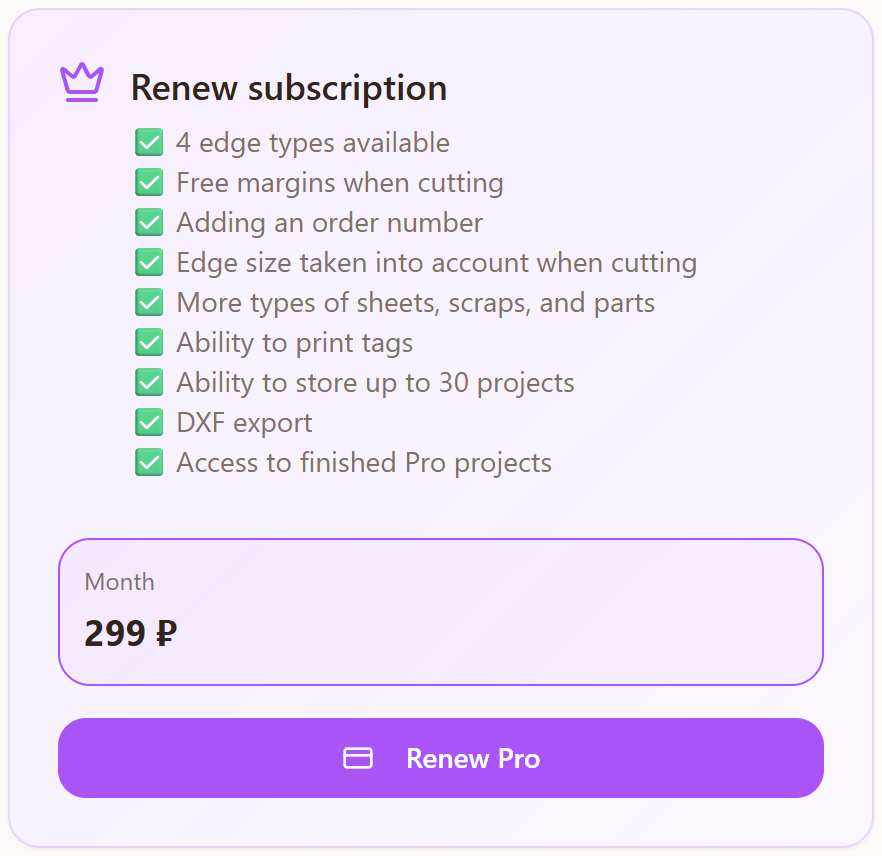
If you're on the free plan and try to use something only available in Pro (like adding a sheet beyond the Free limit), a "Subscribe to Pro" pop-up appears with a list of benefits and two buttons — "Later" and "Proceed to checkout", which takes you to the same profile card.
Possible errors
| What you see | Why it happens | How to fix it |
|---|---|---|
| "No internet connection" when subscribing | The device is temporarily offline | Check your connection and try again. |
| An error after paying, Pro didn't activate | The payment didn't go through on the bank's or payment provider's side | Check your card balance, try a different card, or try again later. You aren't charged for a failed payment. |
| Payment went through, but the card still shows Free | Recognizing the payment takes a few seconds | Wait a moment and refresh the profile page. |
| A "Subscribe to Pro" pop-up appeared | You tried to use something that's only available in Pro | This isn't an error — click "Proceed to checkout" if you want Pro, or "Later" if not. |
Tips
- The subscription doesn't renew automatically — it's a one-time purchase of a period. It simply ends on the date shown, with no repeat charges.
- You can renew ahead of time, without waiting for the current period to end — through the same "Pro subscription" card.
- Longer periods are usually better value — compare the price per month across periods before buying.
Frequently asked questions
Is there a separate pricing page in the app?
No, your plan and billing live in the "Pro subscription" card in your profile. For more details, see raspili.com/tariffs, outside the app.
Does Pro renew automatically?
No. Every purchase is a one-time payment for the chosen period. When it ends, the plan simply switches to Free, with no charges.
How do I cancel the subscription?
There's nothing to cancel — it doesn't renew on its own. To stop paying, just don't buy another period.
Is there a free trial of Pro?
No, there's no trial period — every new account starts on the Free plan.
How much does Pro cost?
Current prices per period are shown on the "Pro subscription" card in your profile and on raspili.com/tariffs.
Can I switch from Free to Pro in the middle of a cutting project?
Yes, you can subscribe at any time — Pro features become available right after payment.